---
title: How to Communicate with Customers Through the Dashboard
description: Learn how to effectively communicate with your customers using Cavago's in-app messaging feature. Follow our step-by-step guide for both the Host Dashboard and mobile app
image: https://blog.cavago.com/hubfs/How%20to%20communicate%20with%20customers.png
---
[](https://info.mycavago.com/)
Menu
[Become a Host](https://app.mycavago.com/?admin=1) [Sign Up](https://mycavago.com/authentication/signup) [Sign In](https://mycavago.com/authentication)
[Home](https://blog.mycavago.com/)
>
[Blog](https://blog.cavago.com/en/host-knowledge-centre)
>
How to Communicate with Customers Through the Dashboard
# How to Communicate with Customers Through the Dashboard
Feb 20, 2025
[Salman Ch](https://blog.cavago.com/en/host-knowledge-centre/author/salman-ch)
[Host Dashboard](https://blog.cavago.com/en/host-knowledge-centre/tag/host-dashboard)
Cavago's in-app messaging feature allows you to connect with customers directly through both the Host Dashboard and the mobile app. This guide will walk you through the process of contacting customers using these platforms.
## Accessing the Cavago Host Dashboard
### Step 1: Log In to Your Cavago Account
- **Web Dashboard**: Log in to the[Cavago Host dashboard](https://blog.cavago.com/en/host-education-centre/how-to-login-to-your-host-dashboard-on-cavago) using your credentials.
- **Mobile App**: Open the [**Cavago Host App**](https://blog.cavago.com/en/host-education-centre/how-to-login-to-your-cavago-host-app) ([Google Play](https://info.mycavago.com/e3t/Ctc/RJ+113/d2pcvx04/VVZftR6SJQfWW4LS2WD1CHWhRW1PHNH55m-lHFN8tN9Dx3qgyTW95jsWP6lZ3m3W8Tdt1G4hyTF0W4N_zyx2H3D7LW6yk6Dw1H-2T_W7Ms4Dq8msKr4W3B0Zdq44pT4_W76ptd-353JmtW7QBklB73dSkwN1CswH4bzDGPW8fvhb_4BRQzSW5b1FMD3l65HkW9fYvMC4fDhKzVmGpRq3KQp8gN8KRdyh61WSZW8W5qJw3bzj5RW28Fkfm1nWvPXW6CprRz361XT4W7d_yQc8CJXG3W4M0_RN8wX5QVW4dYwqD6Z2XtZN3mWjKXvJYn_W2jpJrq3Z4j9HW7b81sp5QyW2wW14Y05Y3drhG4W3VJBKq4NvTKXW412c5W2_xSscW1qZH9M1-sD97VpYgCJ7p2pX1W6r7pM15DxFksW5wylhn1NdJvnW9hGFyk4Qv0Mlf7m0rmY04) / [App Store](https://info.mycavago.com/e3t/Ctc/RJ+113/d2pcvx04/VVZftR6SJQfWW4LS2WD1CHWhRW1PHNH55m-lHFN8tN9Dd3qgyTW8wLKSR6lZ3pdW70XKg81hwhKKVLDKLn5tN2b6W6WGvQ44BGPmfW8_3g3j20JF3gW6GMywG99Rss5VZ4z7q1vn0krW91xx2v7j-Xx5W4jrxD-4ywxLDW10x8ZL1tZlFHW8h29ss6Kcpl5W25-rxg1wLRylW3DWp826zzgCPW95pN2F8mFmmYW7wffvk1-8DQ_N6crhX1N8SdrW5B88K-26txCgW2t2l8l3dhGW3W2s3dqZ336N7lN82hL2Q1tQ72VcB-0425GXfGN2vWlQf5YnwbW2JC3K98-T2ylW8JgNMY8n2g5CW3JqZ2w6QlWs0W5c4QF_99H8jSN6bm427Vqbr4W3-CQJ93sfqGBN5j6Hwms0xFJf5bGJ3F04)) on your device and sign in
### Step 2: Access the Messaging Feature
- Once logged in, locate the **'Messages'** section in the main menu.
- Click on **'Messages'** to view your conversations.
.png?width=719&height=315&name=Cavago%20nowledge%20Centre%20(3).png)
### Step 3: Select a Conversation
- Browse through the list of **conversations** to find the customer you wish to contact.
- Click on the **customer's name** to open the chat.
.png?width=721&height=316&name=Cavago%20nowledge%20Centre%20(4).png)
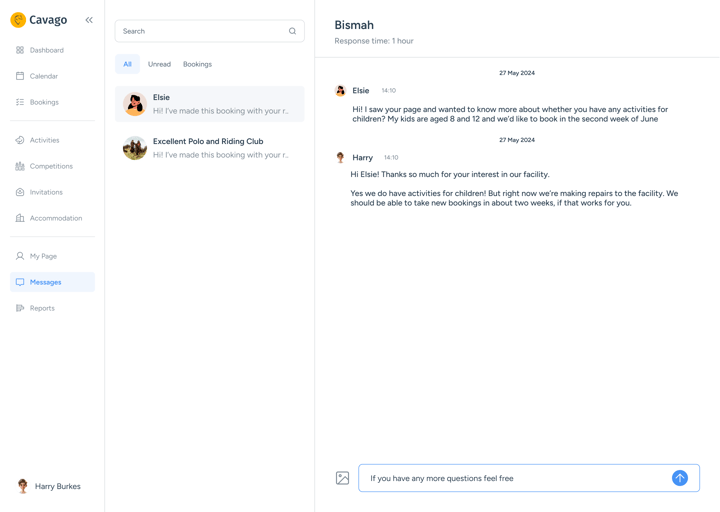
### Step 3: Compose and Send a Message
- In the chat window, type your message in the **text box** at the bottom.
- Click **'Send'** to deliver your message to the customer.
## Using the Cavago Host App
### Step 1: Log In
- Open the [**Cavago Host App**](https://blog.cavago.com/en/host-education-centre/how-to-login-to-your-cavago-host-app) on your mobile device and sign in using your credentials.
.gif?width=478&upscale=true&name=Open%20the%20Cavago%20Host%20App%20%E2%80%93%20Easy%2c%20right%20You%20probably%20already%20have%20it%20on%20your%20phone%2c%20but%20if%20not%2c%20grab%20it%20from%20the%20App%20Store%20or%20Google%20Play.%20(1).gif)
### Step 2: Navigate to Messages
- On the home screen, tap the **'Messages'** icon to access your conversations.
-1.png?width=225&height=453&name=Open%20the%20Cavago%20Host%20App%20%E2%80%93%20Easy%2c%20right%20You%20probably%20already%20have%20it%20on%20your%20phone%2c%20but%20if%20not%2c%20grab%20it%20from%20the%20App%20Store%20or%20Google%20Play.%20(2)-1.png)
### Step 3: Choose a Conversation
- Scroll through your list of conversations to find the customer you want to message.
- Tap on the customer's name to open the chat.
-1.png?width=221&height=445&name=Open%20the%20Cavago%20Host%20App%20%E2%80%93%20Easy%2c%20right%20You%20probably%20already%20have%20it%20on%20your%20phone%2c%20but%20if%20not%2c%20grab%20it%20from%20the%20App%20Store%20or%20Google%20Play.%20(4)-1.png)
### Step 4: Send a Message
- Type your message in the text field at the bottom of the screen.
- Tap the **'Send'** button to send your message.
-1.png?width=224&height=452&name=Open%20the%20Cavago%20Host%20App%20%E2%80%93%20Easy%2c%20right%20You%20probably%20already%20have%20it%20on%20your%20phone%2c%20but%20if%20not%2c%20grab%20it%20from%20the%20App%20Store%20or%20Google%20Play.%20(3)-1.png)
For further assistance, contact Cavago support at [hostsupport@mycavago.com](mailto:HostSupport@mycavago.com).
## [Contact Host Support](mailto:shaafay@mycavago.com)
By clicking “Subscribe,” you confirm to have read Cavago's Privacy Policy
## More You’d Be Interested In ...
[Feb 27, 2025, 8:24:29 AM Frequently Asked Questions for Hosts](https://blog.cavago.com/en/host-knowledge-centre/frequently-asked-questions-for-hosts)
[Jan 28, 2025, 10:09:52 AM How to Login to your Cavago Dashboard.](https://blog.cavago.com/en/host-knowledge-centre/how-to-login-to-your-host-dashboard-on-cavago)
[Jan 28, 2025, 7:44:45 AM How to login to your Cavago Host App](https://blog.cavago.com/en/host-knowledge-centre/how-to-login-to-your-cavago-host-app)
## Check out these Activities:
Cappadocia, Turkey
### Group riding lesson in Turkey
Riding Lesson
#### From GBP 1,739.47
### [Arraiolos, Portugal 1 Hour Dressage Lesson Hourly Activity From $137.00](https://mycavago.com/hosts/monte-velho-6/activities/1-hour-dressage-lesson-high-season-21-31-december-726)
Share this Article:
  
## Read More
[Feb 24, 2026, 10:36:12 AM How To Add a Horse Livery Activity on Cavago](https://blog.cavago.com/en/host-knowledge-centre/how-to-add-a-horse-livery-activity-on-cavago)
[Sep 3, 2025, 7:52:48 AM How to Schedule Each Day Separately](https://blog.cavago.com/en/host-knowledge-centre/how-to-schedule-each-day-separately)
[Apr 7, 2025, 7:03:49 AM How to set up your Cavago profile](https://blog.cavago.com/en/host-knowledge-centre/how-to-set-up-your-cavago-profile)
### Cavago Links
- [User T&C](https://mycavago.com/terms-and-conditions)
- [Privacy & Cookies Policy](https://mycavago.com/privacy-and-cookie-policy)
- [Payments & Refund](https://mycavago.com/payments-and-refund)
### User Links
- [Login](https://mycavago.com/user/auth/login?auth=1)
- [Sign Up](https://mycavago.com/user/auth/login?auth=1)
- [My Account](https://mycavago.com/user/dashboard)
### Connect Links
- [About Us](https://mycavago.com/about-us)
- [Contact Us](https://mycavago.com/contact-us)
- [Become a Partner & Host](https://host.mycavago.com)
### Media Links
- [Blog](https://blog.mycavago.com)
- [News](https://mycavago-20346364.hs-sites.com/news)
- [Whatsapp Chat](https://api.whatsapp.com/send?phone=6587831749)
-
-
-
-
© 2026 CAVAGO PTE. LTD.
```json
{
"@context" : "https://schema.org",
"@type" : "BlogPosting",
"author" : {
"@type" : "Person",
"name" : "Salman Ch",
"url" : "https://blog.cavago.com/en/host-knowledge-centre/author/salman-ch"
},
"dateModified" : "2025-04-07T06:27:30.994Z",
"datePublished" : "2025-02-20T09:36:31.000Z",
"headline" : "How to Communicate with Customers Through the Dashboard",
"image" : [ "https://blog.cavago.com/hubfs/How%20to%20communicate%20with%20customers.png" ],
"mainEntityOfPage" : {
"@id" : "https://blog.cavago.com/en/host-knowledge-centre/how-to-communicate-with-customers-through-the-cavago-app",
"@type" : "WebPage"
},
"publisher" : {
"@type" : "Organization",
"logo" : {
"@type" : "ImageObject",
"url" : "https://blog.cavago.com/hubfs/Plain%20Dark-1.png"
},
"name" : "Cavago Pte Ltd."
}
}
```